# Policy Evaluations
When a configured policy is not followed, the associated GitHub Actions workflow run will be blocked automatically. This helps enforce organization-wide security and compliance standards.
In such a case, you will see the following message within the workflow run:
```
The run was canceled by @stepsecurity-app[bot].
```
### Viewing Blocked Runs in the Dashboard
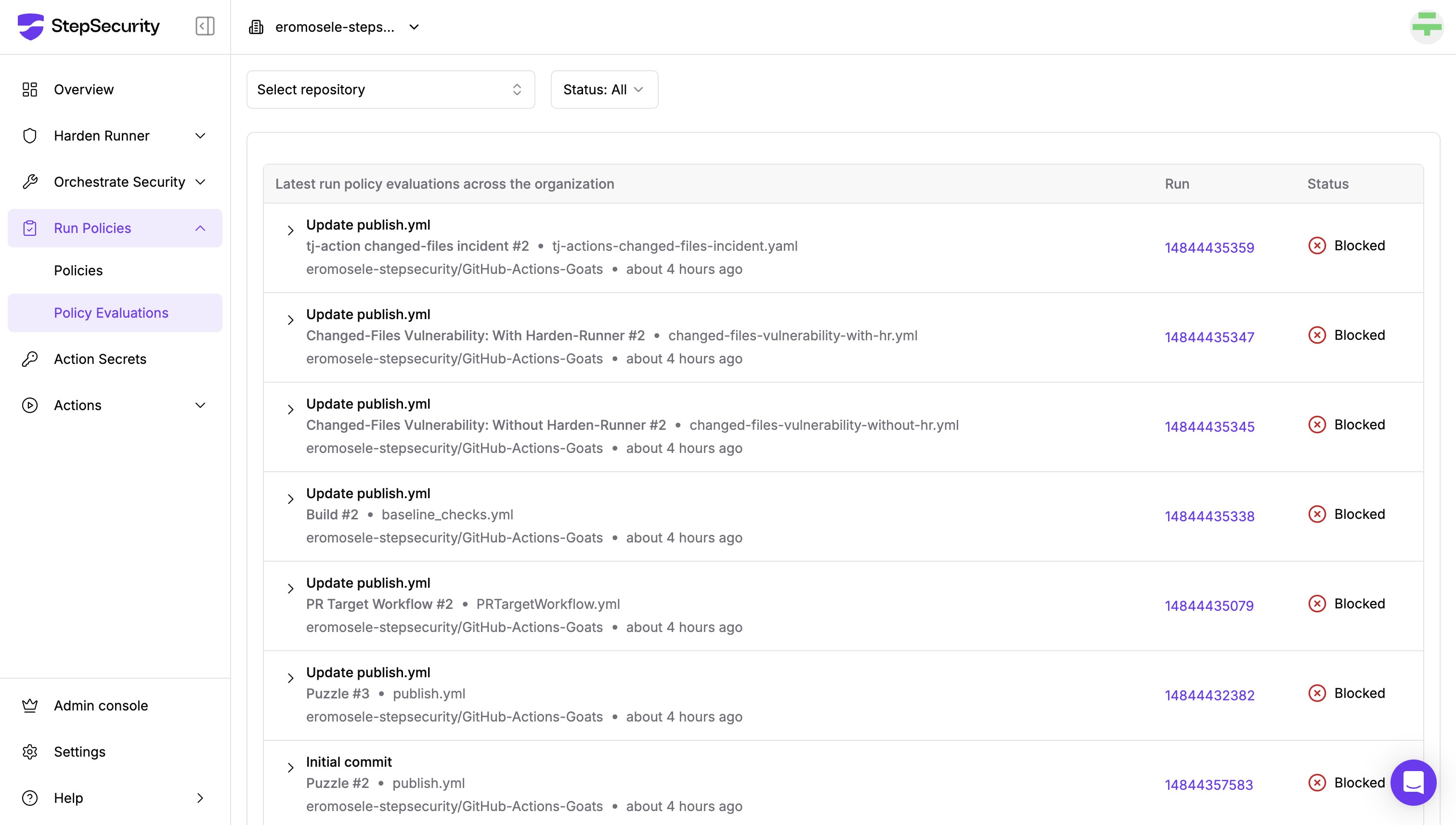
To investigate blocked runs, go to the “Policy Evaluations” dashboard under Run Policies in the StepSecurity platform.
This dashboard provides:
* A list of recent policy evaluation events across your organization.
* Information about the repository, workflow file, and timestamp of each event.
* The status of the run (e.g., Blocked).
* A direct link to the workflow run for deeper inspection.
Policies Evaluations dashboard
### Understanding Why a Run Was Blocked
Click the arrow next to any listed evaluation to expand detailed information about:
* The specific policy or policies that were violated (e.g., *Do not allow GitHub-Hosted Runners*).
* The reason the run was blocked, based on the conditions defined in the policy (e.g., the job was configured to run on ubuntu-latest, which violates the organization’s policy against using GitHub-hosted runners)
Policies Evaluations dashboard showing more details of a failed run