> For the complete documentation index, see [llms.txt](https://docs.stepsecurity.io/llms.txt). Markdown versions of documentation pages are available by appending `.md` to page URLs; this page is available as [Markdown](https://docs.stepsecurity.io/packages/oss-security-feed.md).
# OSS Security Feed
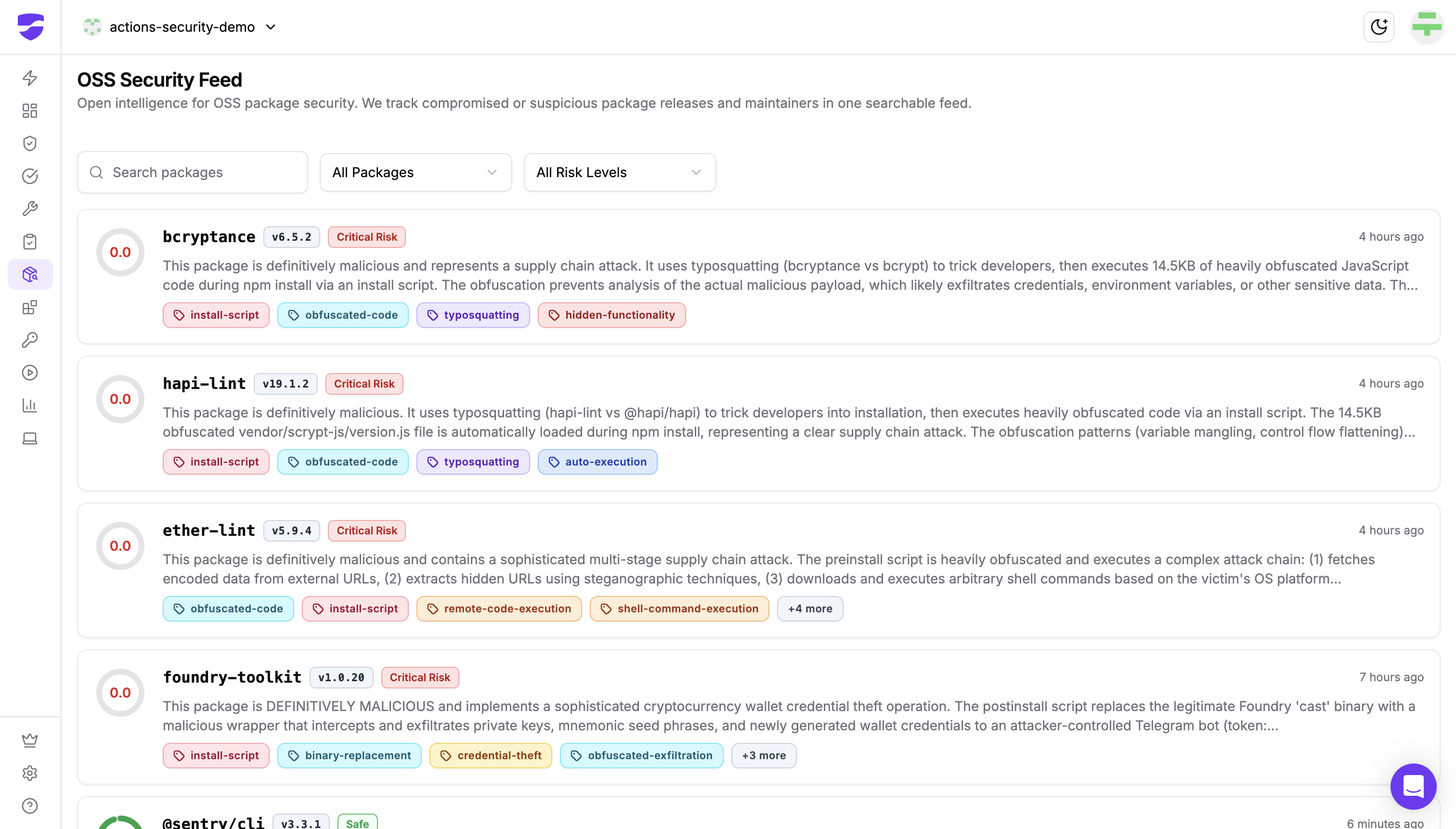
The OSS Security Feed is an open intelligence resource that tracks compromised or suspicious npm package releases and maintainers in a single, searchable interface. It gives developers and security teams a real-time view of malicious packages before those packages reach their pipelines or developer machines.
### What It Shows
Each entry in the feed represents a package version that StepSecurity has analyzed and flagged. For every entry, you can see:
* **Package name and version** — the exact release that was assessed
* **Risk level** — either `Critical Risk` or `Safe`, derived from automated analysis
* **Detection summary** — a plain-language description of what the package does and why it was flagged
* **Behavior tags** — labels such as `install-script`, `obfuscated-code`, `typosquatting`, `credential-theft`, and `remote-code-execution` that categorize the threat type at a glance
* **Time of detection** — how recently the package was flagged
### Risk Levels
| Level | Meaning |
| ----------------- | -------------------------------------------------------------------------------------------------------------------------- |
| **Critical Risk** | The package is definitively malicious or contains behavior strongly consistent with a supply chain attack. Do not install. |
| **Safe** | The package was analyzed and no malicious behavior was detected at the time of assessment. |
{% hint style="info" %}
Risk assessments reflect conditions at the time of analysis. A `Safe` rating for an older version does not guarantee the current version is safe.
{% endhint %}
### Reading an Analysis Report
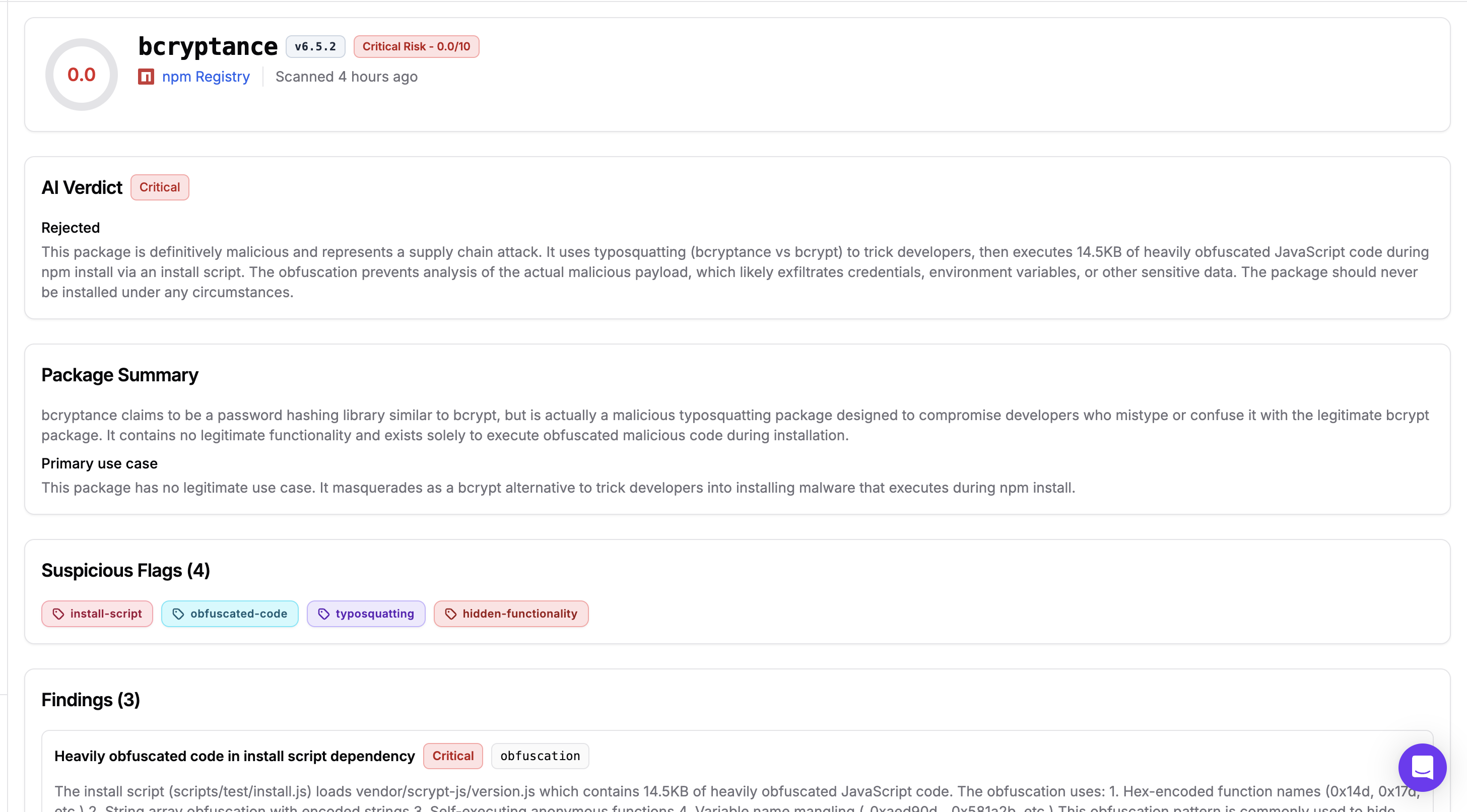
Clicking any feed entry opens a full analysis report. Here is what each section means.
#### Header
Shows the package name, version, registry, risk score, and scan timestamp. A score of **0.0** indicates a definitively malicious package with no redeeming characteristics.
#### AI Verdict
A concise conclusion from StepSecurity's analysis engine covering the attack technique, likely intent, and recommendation. A status of **rejected** means the package failed analysis and poses immediate risk. When paired with **critical** severity, the threat is confirmed rather than suspected.
#### Package Summary
Describes what the package claims to be versus what it actually does, and identifies the primary use case. For malicious packages, this section will explicitly state there is no legitimate use case and explain the deception mechanism used.
#### Suspicious Flags
Categorical tags summarizing detected behaviors. Common flags include:
| Flag | What it means |
| ----------------------- | --------------------------------------------------------------- |
| `install-script` | Code runs automatically during `npm install` |
| `obfuscated-code` | Source is deliberately obscured to hide behavior |
| `typosquatting` | Package name mimics a popular legitimate package |
| `hidden-functionality` | Package performs undocumented actions |
| `remote-code-execution` | Code is fetched from external URLs and executed at runtime |
| `credential-theft` | Targets secrets, tokens, keys, or environment variables |
| `binary-replacement` | A legitimate system binary is replaced with a malicious wrapper |
#### Findings
For `Safe` packages, this section is replaced by a **No security findings** notice, confirming that no malicious behavior was detected for that version. The AI Verdict will show **Recommended** and the score will be high (e.g., 9.5/10).
For flagged packages, this is the most detailed section of the report. Each finding includes:
* **Severity** — `critical`, `high`, or `medium`
* **Finding type** — a short classifier such as `obfuscation` or `install-script-exec`
* **Description and impact** — what was found and what could happen if the package is installed
* **Code snippet** — the exact file and line that triggered the finding
* **CWE reference** — the relevant Common Weakness Enumeration identifier
* **Remediation** — the recommended action
A single package may have multiple findings at different severity levels.
### Acting on a Critical Risk Finding
If a package in your dependency tree appears in the feed with a `Critical Risk` rating follow the [Responding to a Compromised npm Package guide](/start-here/guides/how-to-respond-to-a-compromised-npm-package-in-your-organization.md) for a full incident response walkthrough.
---
# Agent Instructions
This documentation is published with GitBook. GitBook is the documentation platform designed so that both humans and AI agents can read, navigate, and reason over technical content effectively. Learn more at gitbook.com.
## Querying This Documentation
If you need additional information that is not directly available in this page, you can query the documentation by asking a question.
Perform an HTTP GET request on the following URL with the `ask` and `goal` query parameters:
```
GET https://docs.stepsecurity.io/packages/oss-security-feed.md?ask=&goal=
```
`ask` is the immediate question: it should be specific, self-contained, and written in natural language.
`goal` is what the user is ultimately trying to achieve, the reason they need the answer. Sharing it helps GitBook give you a better, more relevant answer. A goal is most helpful when it describes the outcome the user wants rather than restating the question. For example, with `ask=how do I create an API token`, a goal like `automate deployments from our CI pipeline` lets GitBook tailor the answer to that use case.
The response will contain a direct answer to the question and relevant excerpts and sources from the documentation.
Use this mechanism when the answer is not explicitly present in the current page, you need clarification or additional context, or you want to retrieve related documentation sections.