> For the complete documentation index, see [llms.txt](https://docs.stepsecurity.io/llms.txt). Markdown versions of documentation pages are available by appending `.md` to page URLs; this page is available as [Markdown](https://docs.stepsecurity.io/github-actions/workflow-run-policies/policies.md).
# Policies
Use this page to view and manage all workflow run policies created in your organization.
## Creating a New Policy in Your Organization
There are five policy types you can create:
* [Compromised Actions Policy](#compromised-actions-policy) - Block the use of compromised Actions
* [Secret Exfiltration Policy ](#secret-exfiltration-policy)- Prevents unauthorized access to Secrets
* [Allowed Actions Policy ](#allowed-actions-policy)- Block specific GitHub Actions
* [Runner Label Policy](#runner-label-policy) - Prevent or monitor usage of specific runners
* [Harden-Runner Policy](#harden-runner-policy) - Require the Harden-Runner action in every workflow run
* Harden-Runner Policy - Require the Harden-Runner action in every workflow run
Whichever type you choose, also configure how violating runs are stopped. See Enforcement: How Violating Runs Are Stopped.
### Enforcement: How Violating Runs Are Stopped
Every new policy includes an **Enforcement** setting, shown in the policy editor below the Policy Type and Action fields. It controls how StepSecurity stops a workflow run that violates the policy, and the method depends on the runners the run targets. The setting is the same for every policy type: Compromised Actions, Secret Exfiltration, Allowed Actions, Runner Label, and Harden-Runner.
#### **Standard GitHub-hosted runners**
Runs on GitHub's standard hosted runners (`ubuntu-latest`, `windows-latest`, `macos-latest`, and the other standard labels) are always force-cancelled through the GitHub API. This cannot be changed.
#### **All other runners**
This covers every runner that is not standard GitHub-hosted, such as self-hosted runners, custom virtual machine images, and GitHub-hosted larger runners (which use custom labels). Choose one of two methods:
| Method | How the run is stopped | Violation summary in the run |
| ------------------------------------- | ----------------------------------------------------------------------------------------------- | ---------------------------- |
| **GitHub API cancellation** (default) | StepSecurity force-cancels the run through the GitHub API as soon as the violation is detected. | Not displayed |
| **Prejob hook on the runner** | The StepSecurity prejob hook blocks the job before any step executes. | Displayed |
The prejob hook method applies only when every job in the run targets runners covered by **All other runners**. It relies on the StepSecurity prejob hook being installed on those runners. See Runner Job Hooks for setup.
When you choose **Prejob hook on the runner**, tell StepSecurity which runners have the hook installed:
* **All runners**: rely on the prejob hook for every runner other than standard GitHub-hosted. Choose this when the hook is installed on all your runners.
* **Only runners with these labels**: use this while rolling out the prejob hook. Only jobs whose `runs-on` includes one of the listed labels use the hook. All other jobs are cancelled through the GitHub API.
* **All runners except these labels**: jobs targeting the listed labels are cancelled through the GitHub API. Every other job uses the prejob hook.
{% hint style="warning" %}
GitHub-hosted larger runners use custom labels, so they fall under **All other runners**. If your organization uses larger runners and they do not have the prejob hook, choose **Only runners with these labels**, or choose **All runners except these labels** and list the larger runner labels, so those runs are still cancelled through the GitHub API.
{% endhint %}
### Compromised Actions Policy
The Compromised Actions Policy prevents the use of known malicious or compromised GitHub Actions in workflows. It scans for references to actions flagged as security risks and blocks their execution to protect your environment.
#### **Why It Matters**
Workflows often rely on third-party actions, which may be:
* Compromised via account takeovers
* Malicious by design
* Altered to include malware or backdoors
This policy reduces risk by:
* Maintaining a list of compromised actions
* Scanning workflows for those references
* Blocking runs using them
* Alerting developers with actionable feedback
#### **How It Works**
StepSecurity's threat intelligence team continuously monitors the GitHub Actions ecosystem for compromised actions. When the team learns that an action has been compromised, it manually verifies the compromise and then adds the action to the compromised actions list that StepSecurity maintains.
Once an action is on the list, any new workflow run that uses it is blocked from execution. StepSecurity sends a cancel API call to the workflow run, so the run is canceled before the compromised action can do harm.
**Lifecycle of a compromised action event**
1. **Discovery**: The threat intelligence team learns of a potential compromise through continuous monitoring.
2. **Verification**: The team manually verifies the compromise before taking action.
3. **Blocking**: The action is added to the compromised actions list. New workflow runs that reference it are canceled automatically.
4. **Notification**: Each addition to the list is accompanied by a [Threat Center](/workspace/threat-center.md) entry and a threat intel notification, so you are alerted when such an event happens.
5. **Return to normal operations**: Once the action's repository has been cleaned up, blocking is limited to the specific compromised commit SHAs only. The action as a whole is no longer blocked, and workflows referencing clean versions run normally.
**Viewing the current list**
The policy editor shows the compromised actions the policy currently checks for, under **Currently known compromised actions**. Each entry shows whether all versions of the action are compromised or only specific versions (for example, release tags that were re-pointed to a malicious commit). The list updates automatically as StepSecurity's threat intelligence team adds new compromises, so the count and entries you see reflect the live list.
**Point-in-time evaluation records**
Every policy evaluation records the compromised actions list as it existed at the time of the run. When you review a past evaluation on the Policy Evaluations page, you can open **Compromised actions list at run time** to see exactly which entries the run was checked against. Actions added to the list after that run are not shown, so you can always reconstruct why a run was or was not blocked.
**What Developers See**
If a compromised action is used:
* The workflow is automatically canceled and a PR comment explains the violation and suggests trusted alternatives
To try the Compromised Action policy, add this action to your workflow:
```
step-security/dummy-compromised-action@main
```
**To create a compromised Actions policy, follow the steps below:**
**Step 1: Navigate to the Workflow Run Policies page**
* Go to your StepSecurity dashboard, then to Workflow Run Policies → Policies in the sidebar.
**Step 2: Click “Create Policy”**
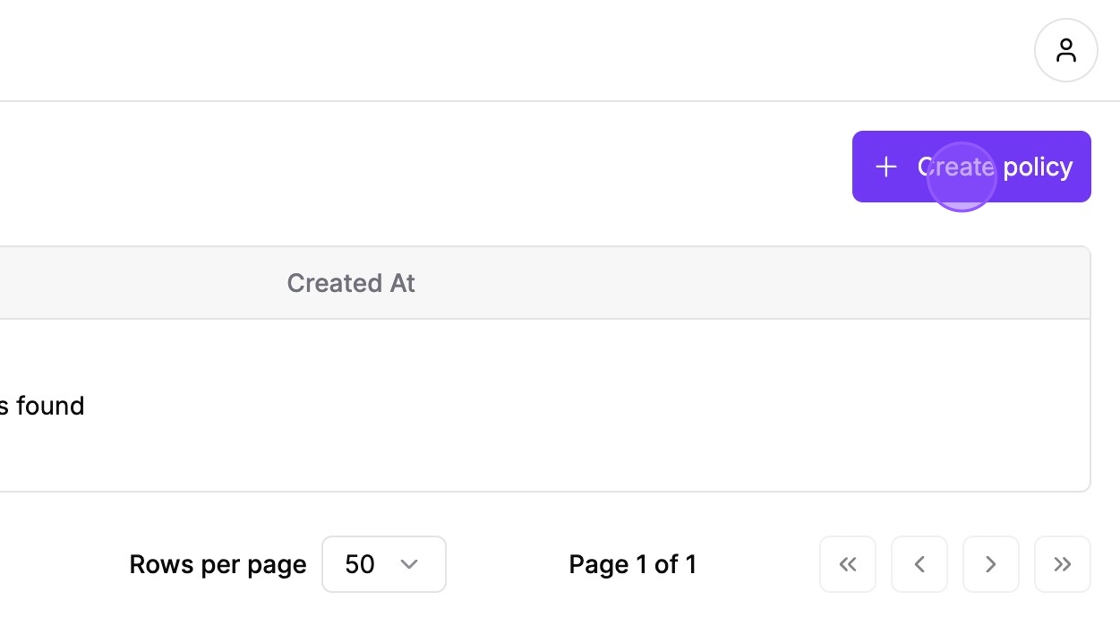
* Click the Create Policy button on the top right of the page.
Click the create button
**Step 3: Fill in Policy Details**
* Policy Name – e.g., *Compromised Actions Policy*
* Policy Type – Select "Compromised Actions Policy"
* Action – Choose between:
* Enforce: Actively blocks compromised Actions
* Dry Run: Does not block the workflow run but records the violation in the Evaluations page
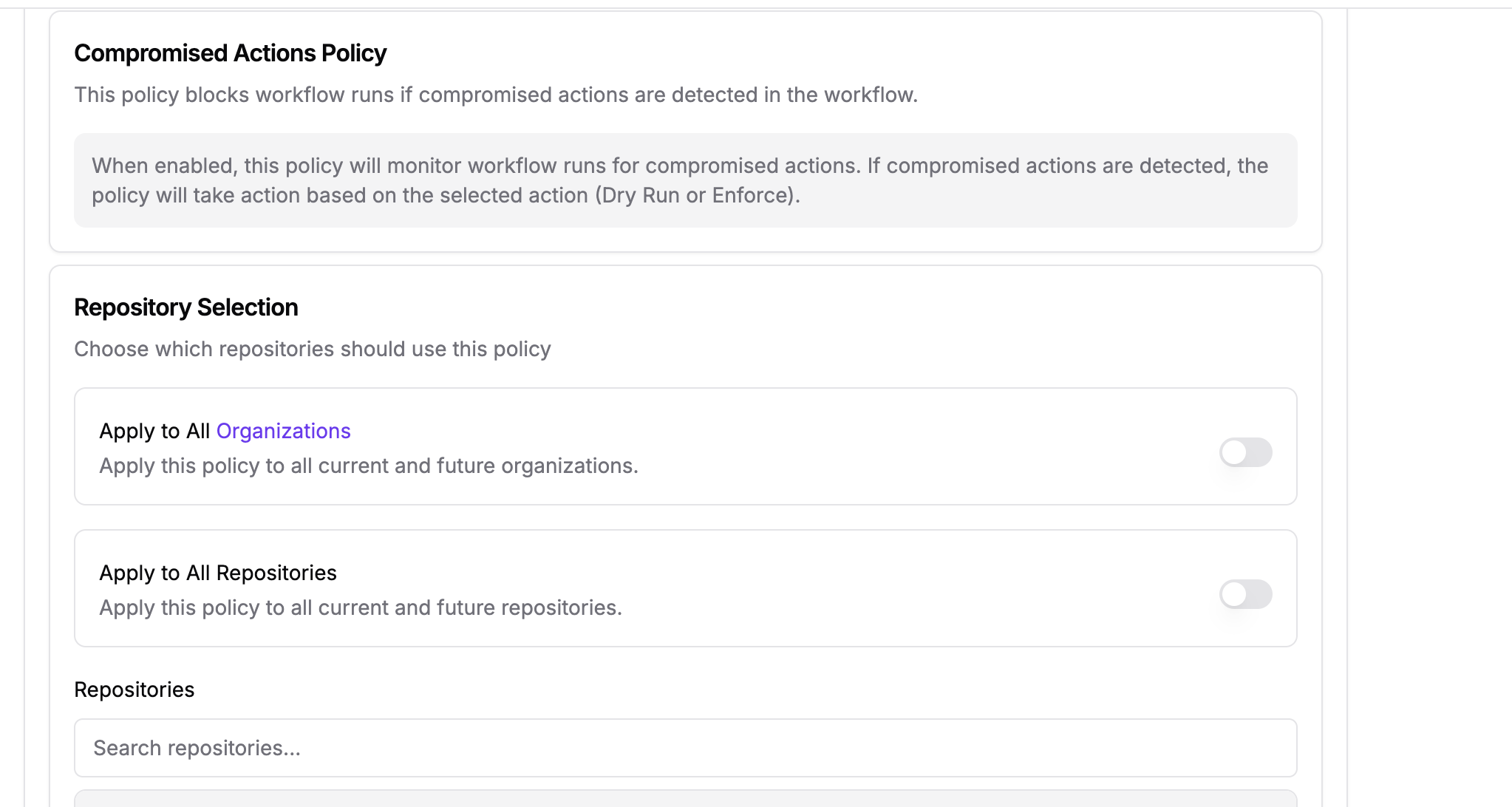
Setting up Compromised Actions Policy
**Step 4: Review the currently known compromised actions**
The policy editor lists the compromised actions the policy will check for, under **Currently known compromised actions**, with the affected versions of each. No configuration is needed here: StepSecurity maintains this list and updates it automatically, so it is shown for review only.
**Step 5: (Optional) Customize the PR Comment Template**
The editor includes a PR Comment Template used when this policy blocks a run from a pull request. Leave the default unchanged to use the standard StepSecurity comment, or customize it. See [PR Comment Template](#pr-comment-template) for the default template and supported placeholders.
**Step 6: Select Repositories/Organizations**
* Choose whether to apply the policy to:
* All current and future repositories/organizations *(default)*, or
* Select specific repositories/organizations manually
**Step 6: Save the Policy**
* After configuring all settings, click Save to create the policy.

Follow this interactive demo to see how this workflow run policy works in practice:
{% embed url="" %}
### Secret Exfiltration Policy
The Secret Exfiltration Policy protects against unauthorized secret access in GitHub Actions. It blocks modified workflows in non-default branches from using secrets unless explicitly approved.
#### **Why It Matters**
Workflows often need secrets to access protected resources. Attackers may exploit non-default branches to run malicious workflows and exfiltrate secrets. This policy helps stop that by:
* Allowing secret access only if the workflow matches the default branch
* Enforcing approval for legitimate changes
* Creating an auditable approval trail
**How It Works**
* Detects non-default branch workflows accessing secrets (${{ secrets.X }}, toJSON(secrets))
* Compares workflow content to the default branch using SHA256
* Requires a workflows-approved label from a different team member for approval
* Blocks runs without proper matching or approval
**What Developers See**
If a modified workflow accesses secrets:
* The run is canceled, and a PR comment explains the block and how to get approval (a teammate has to add the "**workflows-approved**" label to the PR)
* Once the "workflows-approved" label has been added by a teammate, the workflow can be re-run
#### Creating a **Secret Exfiltration** Policy
**Step 1: Select “Secret Exfiltration Policy”**
* You can exempt specific users or bot accounts from this policy. When a workflow is triggered by an exempted user or bot, the run will not be blocked by the policy.
**Step 2: (Recommended) Block only bulk secrets access**
Toggle **Block only when a workflow accesses all secrets at once** on to block only pull requests that introduce bulk secret access patterns such as `${{ toJSON(secrets) }}`, which dump every secret at once. Targeted references such as `${{ secrets.NPM_TOKEN }}` are not blocked.
Most real-world CI/CD secret exfiltration attacks use bulk-access patterns. This mode provides targeted protection while dramatically reducing false positives, so you do not need to exempt repositories whose workflows legitimately reference individual secrets.
**Step 3: (Optional) Analyze default branch runs**
Toggle **Analyze default branch runs** on to also block workflow runs on the default branch when the workflow references secrets. The diff-vs-default-branch comparison and the `workflows-approved` label do not apply on the default branch.
{% hint style="info" %}
We recommend pairing this option with the bulk-access toggle above to limit the blast radius, since workflows on the default branch commonly make legitimate use of individual secrets.
{% endhint %}
**Step 4: (Optional) Customize the PR Comment Template**
The editor includes a PR Comment Template used when this policy blocks a run from a pull request. Leave the default unchanged to use the standard StepSecurity comment, or customize it. [See PR Comment Template](#pr-comment-template) for the default template and supported placeholders.
**Step 5: Choose Target Repositories/Organizations and save the policy**
Follow this interactive demo to see how this workflow run policy works in practice:
{% embed url="" %}
### Allowed Actions Policy
Use this policy to enforce an allowlist of GitHub Actions. Any action not on the allowlist is blocked (Enforce) or flagged (Dry Run). You can also require that every allowed action be pinned to a specific commit SHA, which protects against tag-overwrite and supply-chain attacks.
#### Why It Matters
Every third-party GitHub Action that runs in your workflow inherits access to your repository's `GITHUB_TOKEN` and any secrets the job exposes. An unvetted, typosquatted, or compromised action can:
* Exfiltrate secrets, tokens, or source code
* Inject malicious code into build artifacts
* Pivot into internal systems via repository-scoped credentials
* Execute arbitrary commands with the permissions of the workflow
Maintaining an allowlist narrows your exposure to the set of actions your security team has reviewed. Requiring pinned references on top of that protects you from a second category of attack: a previously-trusted action whose `@v4` tag or `@main` branch is moved to point at malicious code — the pattern behind the `tj-actions/changed-files` compromise and similar incidents.
#### Creating an **Allowed Actions** Policy
**Step 1: Select “Allowed Actions Policy”**
**Step 2: (Optional) Require pinned actions**
Toggle **Only allow pinned actions** on if you want to block any action reference that is not pinned to a commit SHA. This applies on top of the allowlist — an action must be both allowlisted and pinned to pass.
**Step 3: Add Actions to Allowlist**
* Manually type and add actions (e.g., `actions/checkout`) **OR**
* Use All Actions (Used) to select from known usage
* Select one Action and click "Add to Allowed List"

* Decide whether to allow all versions (default) or select specific commit versions **OR**

* **Use Repository Filter (Optional):** Go to **By Repository (Used)** tab → Select a repo → Add used actions

**Step 4: (Optional) Customize the PR Comment Template**
The editor includes a PR Comment Template used when this policy blocks a run from a pull request. Leave the default unchanged to use the standard StepSecurity comment, or customize it. See [PR Comment Template](#pr-comment-template) for the default template and supported placeholders.
**Step 5: Click "Save"**
Follow this interactive demo to see how this workflow run policy works in practice:
{% embed url="" %}
### Runner Label Policy
Use this policy to block untrusted GitHub-hosted runners or allow only specific self-hosted runners.
#### Why It Matters
The `runs-on` value determines what machine a job actually executes on, and different runner labels have very different security and cost profiles.
The Runner Label Policy lets you enforce that jobs only execute on approved runner labels. This is useful when you want to block specific runner types, for example, preventing the use of GitHub-hosted runners because your organization standardizes on self-hosted runners for security or compliance reasons. With the allow list mode, you can go further and pin down exactly which labels and runner constraint values are permitted, including the structured `runs-on` strings used by third-party runner providers.
#### Creating a Runner Label Policy
**Step 1: Fill in Policy Details**
* Policy Name – e.g., *Do not allow GitHub-Hosted Runners*
* Policy Type – Select Runner Label Policy
* Action – Choose between:
* Enforce: Actively blocks disallowed runner labels
* Dry Run: Does not block the workflow run but records the violation in the Evaluations page
**Step 2: Choose a restriction mode**
The policy operates in one of two modes:
* **Disallowed labels (block list)**: blocks workflows that use any label on the list; everything else is allowed.
* **Allowed labels & constraints (allow list)**: only labels and constraint values on the list may be used. Each configured dimension is enforced independently, and a run that uses any label or constraint value outside the list violates the policy.
**Step 3 (Disallowed mode): Specify disallowed runner labels**
You can disallow runner labels in two ways, and combine both in the same policy:
* **Generic label groups**: check **GitHub-hosted standard runners** to disallow every GitHub-hosted standard runner label (Ubuntu, Windows, and macOS, covering latest, versioned, ARM, and preview labels) in one step. The group excludes larger runners and self-hosted runners. Click the label count next to the group name to see exactly which labels it represents. StepSecurity keeps this list up to date automatically as GitHub adds or retires labels, so you do not need to edit the policy when new runner images ship.
* **Custom labels**: type a runner label (e.g., `ubuntu-latest`, `my-self-hosted-runner`) and press Enter to add it. Use this for individual labels or labels not covered by a group.
Workflows using any disallowed runner label will be blocked by this policy.
**Step 3 (Allowed mode): Specify allowed labels and constraints**
In allowed mode, checking a generic label group allows all of its runner labels. Beyond groups, you configure two things:
* **Allowed labels**: plain runner labels (no `=`) that this policy permits, such as `ubuntu-latest` or `self-hosted`. You can also paste an entire `runs-on` string here to allow it verbatim. Leave the field empty to not restrict plain labels.
* **Runner constraints**: allowed values for each structured `runs-on` key, following the runs-on.com scheme (`family`, `cpu`, `image`, `ami`, `volume`, and so on). This is designed for teams using third-party runner providers such as RunsOn, which provision self-hosted machines through structured `runs-on` strings like:
```yaml
runs-on: runs-on=${{ github.run_id }}/runner=2cpu-linux-x64/extras=s3-cache
```
Add one constraint row per key with all the values you want to allow. For example, a `cpu` row with `2`, `4`, and `8` allows any of those values. Only the keys you configure are enforced; any other `key=value` dimension a workflow uses is left unrestricted.
A few matching rules to be aware of:
* For a combined value like `cpu=2+8`, add it either as the single value `2+8` (order does not matter, so `8+2` matches too) or as the separate values `2` and `8`.
* Expression values are matched by their exact text (whitespace-insensitive). For example, a `runs-on` row with the value `${{ github.run_id }}` requires any `runs-on` routing token to use exactly that expression. On a key the policy configures, an expression that is not listed violates the policy: with `family` configured, `family=${{ vars.RUNNER_FAMILY }}` is blocked unless that exact expression is added as an allowed value. Keys the policy does not configure are not restricted: their values, expressions included, are allowed.
**Step 4: (Optional) Customize the PR Comment Template**
The editor includes a PR Comment Template used when this policy blocks a run from a pull request. Leave the default unchanged to use the standard StepSecurity comment, or customize it. See [PR Comment Template](#pr-comment-template) for the default template and supported placeholders.
**Step 5: Select Repositories/Organizations**
Choose whether to apply the policy to:
* All current and future repositories/organizations *(default)*, or
* Select specific repositories/organizations manually
Select Repositories
**Step 6: Save the Policy**
* After configuring all settings, click Save to create the policy.

Follow this interactive demo to see how this workflow run policy works in practice:
{% embed url="" %}
### Harden-Runner Policy
The Harden-Runner Policy ensures that every workflow run in your organization executes in a hardened environment. It blocks jobs where the [Harden-Runner](https://github.com/step-security/harden-runner) action is missing, or where it is present but is not configured as the first step of the job. It can additionally require that Harden-Runner's runtime policy comes from the StepSecurity policy store, and block jobs that run entirely inside a container, where Harden-Runner has no visibility.
#### **Why It Matters**
Harden-Runner provides runtime security for GitHub-hosted runners: network egress filtering, file integrity monitoring, process monitoring, and outbound call auditing. These protections only take effect if the action is initialized **before** any other step runs. A job that runs `actions/checkout` or installs dependencies before Harden-Runner has already given any malicious code an unmonitored window to execute. Two configurations undermine the protection in subtler ways: a workflow-defined `policy:` input can be weakened in the same PR that introduces malicious code, and a job-level `container:` on a GitHub-hosted standard runner hides all of the job's outbound calls from Harden-Runner entirely.
This policy reduces risk by:
* Guaranteeing that Harden-Runner is adopted consistently across all covered repositories
* Preventing developers from accidentally (or intentionally) removing Harden-Runner from a workflow
* Ensuring Harden-Runner is always the first step, so no code executes before monitoring is active
* Supporting organization-specific bootstrap actions as valid Harden-Runner equivalents
* Optionally requiring `use-policy-store: true`, so the runtime policy is centrally managed in the StepSecurity policy store and cannot be weakened by editing the workflow file
* Optionally blocking jobs that run entirely inside a container on GitHub-hosted standard runners, closing the monitoring blind spot that job-level `container:` creates
* Optionally excluding specific runner pools, such as custom runners that cannot run the Harden-Runner action, from a policy that otherwise applies to every job
#### Creating a Harden-Runner Policy
**Step 1: Fill in Policy Details**
* **Policy Name** — e.g., `Require Harden-Runner`
* **Policy Type** — select **Harden-Runner Policy**
* **Action** — choose between:
* **Enforce**: actively blocks jobs that are missing Harden-Runner or have it configured incorrectly
* **Dry Run**: does not block the workflow run but records the violation on the Evaluations page
**Step 2: (Optional) Scope the policy with Target runner labels**
By default the policy applies to **all jobs** across the selected repositories, including self-hosted runners that may not have the Harden-Runner action available.
To restrict the policy to specific runner types, toggle **Target runner labels** on, then select the labels the policy should apply to:
* **Generic label groups**: check **GitHub-hosted standard runners** to target every GitHub-hosted standard runner label (Ubuntu, Windows, and macOS, covering latest, versioned, ARM, and preview labels) in one step. The group excludes larger runners and self-hosted runners, and StepSecurity keeps its label list up to date automatically.
* **Custom labels**: type a label (e.g., `ubuntu-latest`) and press Enter to add it.
The policy will then only evaluate jobs whose `runs-on` value matches one of the selected labels. Target labels are matched as follows:
* **Plain labels** (no `*`) must match a `runs-on` label exactly, including case. A plain label never matches a `runs-on` label that contains a GitHub expression, such as `custom-runner-${{ github.run_id }}`.
* **Labels with a `*` wildcard** are matched as patterns, where `*` stands for any sequence of characters. Wildcard labels are also checked against `runs-on` labels that contain a GitHub expression, so `custom-runner-*` targets a job that runs on `custom-runner-${{ github.run_id }}`. Matching is still case-sensitive.
{% hint style="info" %}
Use this when you have a mix of GitHub-hosted and self-hosted runners and only want to enforce Harden-Runner on GitHub-hosted ones.
{% endhint %}
**Step 3: (Optional) Exclude runner labels**
Use **Exclude runner labels** to skip jobs on specific runners, even when the policy would otherwise apply to them. This lets you keep an organization-wide Harden-Runner Policy in place while carving out a pool of runners that cannot run the Harden-Runner action, such as a set of custom runners.
Type a label or pattern (e.g., `custom-runner-*`) and press **Enter** to add it.
Exclusions follow these rules:
* **Exclusion takes precedence over targeting.** A job is skipped if any label in its `runs-on` matches any exclusion entry. This applies whether **Target runner labels** is off (the policy covers all jobs) or on and the job also matches a target label.
* **Matching is case-insensitive.** `Custom-Runner-*` and `custom-runner-*` exclude the same jobs.
* **Every entry supports the `*` wildcard.** `*` stands for any sequence of characters, including none, and it is the only wildcard character.
* **Labels built from GitHub expressions are covered.** `custom-runner-*` excludes a job that runs on `custom-runner-${{ github.run_id }}`, a pattern teams use to give each run a unique runner label.
* **A lone `*` is not accepted.** It would exclude every job and leave a policy that appears to be enforcing while covering nothing.
For example, with `custom-runner-*` in **Exclude runner labels** and **Target runner labels** off, the Harden-Runner Policy skips this job and continues to evaluate jobs on every other runner:
```yaml
jobs:
build:
runs-on: custom-runner-${{ github.run_id }}
steps:
- uses: actions/checkout@v4
```
The table summarizes how the two label settings differ:
| | Target runner labels | Exclude runner labels |
| ------------------------------------- | ---------------------------------------- | --------------------------- |
| Effect on matching jobs | Only matching jobs are evaluated | Matching jobs are skipped |
| Precedence | Applied after exclusions | Always wins |
| Case sensitivity | Case-sensitive | Case-insensitive |
| `*` wildcard | Supported | Supported |
| Labels containing a GitHub expression | Matched only by entries that contain `*` | Checked against every entry |
{% hint style="warning" %}
Jobs that match an exclusion are not required to run Harden-Runner. Keep exclusion patterns as specific as possible, for example `custom-runner-*` rather than `custom-*`, so that no other runners are skipped unintentionally.
{% endhint %}
**Step 4: (Optional) Add Custom Actions**
If your organization wraps Harden-Runner inside an internal bootstrap action, add those actions under **Custom Actions** so they are recognized as valid Harden-Runner equivalents.
* Type the action's `owner/repo` (for example, `my-org/bootstrap-security`) and press **Enter** to add it.
* Version tags are ignored. Matching is done on the action name only.
**Step 5: Select Repositories/Organizations**
Choose whether to apply the policy to:
* All current and future repositories/organizations *(default)*, or
* Specific repositories/organizations selected manually
**Step 6: Save the Policy**
**Follow this interactive demo to see how this workflow run policy works in practice:**
{% embed url="" %}
### PR Comment Template
When a policy blocks a run that originates from a pull request, StepSecurity posts a comment on the PR explaining the block. You can customize this comment per policy in the policy editor, or leave the default unchanged (or reset it) to use the standard StepSecurity comment:
```
## {{policy_type}} Violation
[This workflow run]({{workflow_run_url}}) was blocked by the **{{policy_name}}** run policy.
{{policy_details}}
{{remediation}}
For more information, see [StepSecurity's documentation]({{docs_url}}).
```
The template supports the placeholders `{{workflow_run_url}}`, `{{policy_type}}`, `{{policy_name}}`, `{{policy_details}}`, `{{remediation}}`, `{{actor}}`, `{{owner}}`, `{{repo}}`, and `{{docs_url}}`.
---
# Agent Instructions
This documentation is published with GitBook. GitBook is the documentation platform designed so that both humans and AI agents can read, navigate, and reason over technical content effectively. Learn more at gitbook.com.
## Querying This Documentation
If you need additional information that is not directly available in this page, you can query the documentation by asking a question.
Perform an HTTP GET request on the following URL with the `ask` and `goal` query parameters:
```
GET https://docs.stepsecurity.io/github-actions/workflow-run-policies/policies.md?ask=&goal=
```
`ask` is the immediate question: it should be specific, self-contained, and written in natural language.
`goal` is what the user is ultimately trying to achieve, the reason they need the answer. Sharing it helps GitBook give you a better, more relevant answer. A goal is most helpful when it describes the outcome the user wants rather than restating the question. For example, with `ask=how do I create an API token`, a goal like `automate deployments from our CI pipeline` lets GitBook tailor the answer to that use case.
The response will contain a direct answer to the question and relevant excerpts and sources from the documentation.
Use this mechanism when the answer is not explicitly present in the current page, you need clarification or additional context, or you want to retrieve related documentation sections.





.jpeg?alt=media&token=ac84d62d-6afc-40d7-9d93-e69f01d32ba0)